Pages

Tuesday, March 18, 2014

SSIS's BULK insert error msg

Problem

When you are trying Bulk insert from csv file, here is the error message you may run into:

“Could not bulk insert because file 'C:csv_filename.txt' could not be opened. Operating system error code 3(The system cannot find the path specified.).”

Solution

First of all, confirm that you are specifying the UNC (Universal Naming Convention) path and not just drive letters. If you are trying to create the file to a remote location then the path should follow UNC, i.e:

             \\Server_Name or IP_ADDRESS\Shared_Folder_PATH(Name)\FILE_NAME

Note that the path may be OK if you are trying to create the file on the SAME server running SQL Server.

Secondly, make sure that the SQL Server service account has permissions to SQL Server instance.
For doing this you can use a Domain user or, create a new local user and start the services with that account.
Go to the lower left corner of the desktop, click START, input “services.msc”, then choose “SQL Server” as shown below:

bulkInsertService
Check Log On AS, a new window will pop up.

bulkInsertServiceLogon
The default setting is Local System account. Try changing it with a domain user account and restart SQL Server Service after new changes.

Last but not least, make sure that this account has Read and Write permissions on the folder where you are creating the file. To do so, right click on the folder --> sharing and security --> permissions.

That’s it! Now the error message should have been swept away.

Sunday, March 16, 2014

SSAS error msg: Unable to retrieve data mining algorithms

Problem

When you tried to create a new mining structure in SSAS, you may notice a warning message appears in the window as shown below:

ErrorMsgSetup_thumb1

Unable to retrieve a list of supported data mining algorithms. Make sure you are connected to the correct Analysis Services server instance and the Analysis Services server named localhost is running and configured properly. You can continue with a default list of data mining algorithms.”

Solution:

Step 1: Check Analysis Service has been started from SQL Server Configuration Manager.

SSAS_serviceStarted_thumb2

Step 2: Check the deployment property to make sure that it has been set up correctly.

SSAS_deployServer_thumb2

Friday, March 14, 2014

Snowflake Schemas Vs. Star Schemas

Today we will briefly discuss the difference between star and snowflake schemas, and what you should consider when you make decisions for a data warehouse design.

What are star schemas and snowflake schemas?

In dimensional data warehousing, star schemas represent a dimensional model which is composed of a central fact table and multiple “de-nomalized” dimension tables around the fact table. The hierarchy dimension are flattened into a single table. For example, in the sample data warehouse of AdventureWorks, the customer dimension may contain attributes about customers such as title, name, date of birth, address in one table. Or for a data warehouse in healthcare, the provider dimension would contain attributes about providers and also practices that providers belong to. Thus, there are some redundancy for star schemas.

On the other hand, a snowflake schema can be regarded as a special type of a star schema. It contains a central fact table and multiple normalized tables to represent one dimension. For example, the Customer dimension can be represented by Customer table and Geography table as shown below.

snowFlake2

In the example of the provider dimension, it may have one Practice table containing all practices’ attributes and another table contains only providers’ attributes and a foreign key pointing to the Practice table.

Differences or trade-offs

In terms of disk space, star schemas cost more space because snowflake schemas contain more normalized dimension tables, and thus removes some of the attribute redundancy in dimension tables. (But compared to the size of fact tables, the dimension tables usually are negligible.)

However, in terms of performance, star schemas usually give better performance in most cases because if a query in snowflake schemas may need many joins to do a data aggregation.

Also, a dimension table in snowflake schema may have one or more parent tables. So the dimensions in a snowflake schema must be highly controlled and managed to avoid update and insert anomalies.

Thus, Kimball design tips recommended star schemas in regards of understandability and performance. Even when using snowflake schemas, views are suggested to be placed on top of the dimensions so that they appear to the user as a single dimension.

Cases to choose snowflake schemas

There are some user cases that snowflake schemas may be a better choices:

  • Based on query frequency: Large customer dimensions such as Amazon or Facebook, where, for example, 90 percent of the fact table measurements involve anonymous visitors about whom you collect little detail, and 10 percent involve reliably registered customers about whom you collect much detailed data by tracking many dimensions. Moving the 10 percent registered customers as a separate dimension can improve performance.
  • Sparsely populated attributes, where most dimension records are NULL, are moved to a sub-dimension.
  • Low cardinality attributes that are queried independently. For example, a product dimension may contain thousands of products, but only a handful of product types.  So if the product types are often queried independently, it is better to have a separate product type dimension. Another example could be the provider dimension may contain a very large number of demographic attributes at the practice level. Rather than repeat a large number of attributes in the provider dimension, we might create a special type of normalized practice dimension called a “dimension outrigger” where the attributes are stored in the provider dimension.
  • Attributes that are part of a hierarchy and are queried independently. Examples include the year, quarter, and month attributes of a date hierarchy; and multiple enterprise calendar dimensions.

In summary, before making decision on which schema to use, you should have business requirements defined about how this data warehouse is used. You should reflect how users want to aggregate and “slice and dice” historical fact table data. You must embrace the goal of enhancing business value as its primary purpose. Work closely with business users, uncover the needs of your business users, then design a system that meet their needs!

Wednesday, February 26, 2014

2014 Gartner Magic Quadrant Reports for BI and Analytics Platform: leaders & trends

2014 Gartner magic quadrant report for business intelligence and analytics platform was released last week.  The report rates the strengths and weaknesses of 27 vendors in the market according to 17 defined capabilities across three categories: information delivery, analysis and integration.  Below is a snapshot of vendors’ performance charted on a graphical quadrant.


gartner-mq-2014

Who are leaders?

The two main axis remain the same as in 2013 report: completeness of vision and ability to execute. It added some capabilities such as Geospatial and location intelligence, Embedded advanced analytics, Business user data mashup and modeling, Embeddable analytics, and Support for big data sources. Tableau leads in ability to execute and IBM/SAS lead in completeness of vision. QlikView, Microsoft, SAP, Tibco, Oracle, MicroStrategy remain in leader quadrant.

What are the trends for 2014?

The answer is “business-user-driven data discovery and analysis” and “Cloud BI”. “The BI and analytics platform market is in the middle of an accelerated transformation from BI systems used primarily for measurement and reporting to those that also support analysis, prediction, forecasting and optimization”, according to Gartner's 2014 reports.The data-discovery category was pioneered by Tableau, Qlikview, Microsoft, IBM and SAS, which have done a better job than the others of integrating their enterprise and new data discovery capabilities.

I highly recommend you to read more detailed analysis of report here or download it from http://www.qlik.com/mq2014.

Monday, February 24, 2014

How to: Do Incremental Loading by Hashbytes Function with Stored Proc

Using hash functions in sql server for incremental data loading has a big performance advantage when you have millions of rows to load, or have several dozens of columns to compare and make decision on whether to update, insert, or expire, as mentioned by Andy Leonard's Anatomy of an Incremental Load. Brett Flippin has introduced the way to calculate hash columns with SSIS’s Script Components in his article Speeding Up Incremental ETL Processes in SSIS by Using MD5 Hashes. Today I would like to demonstrate how to calculate hash columns by stored procedures. This stored procedure will automatically concatenate all columns except hash columns for given tables, and then generate a hashKey for each row. What you need to provide is the name of the table. So it saves the time and efforts to drag and draw columns for tables with different structures.

First let's start with the script to create our test database and destination table:

-- Create test database
use master
go
if exists(select name from sys.databases where name = 'DemoSQL2012')
drop database DemoSQL2012
go
create database DemoSQL2012
go
-- Create Contact Destination table
use DemoSQL2012
go
if exists(select name from sys.tables where name = 'hashTest')
drop table dbo.hashTest
go

CREATE TABLE [dbo].[hashTest](
[personId] [int] IDENTITY(1,1) NOT NULL,
[firstName] [varchar](10) NULL,
[lastName] [varchar](10) NULL,
[hashKey] [varbinary](256) NULL,
CONSTRAINT [PK_hashtest] PRIMARY KEY CLUSTERED
(
[personId] ASC
))

Insert INTO [dbo].[hashTest] ([firstName], LastName)
VALUES ('David', 'Smith'),
('Bob', 'Stones')

If you check the table dbo.hashTest, you will see that it has four columns and two records, with hashKey column set as NULL.
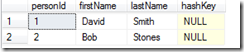

hashtableStart


Create Stored Proc dbo.GetHashKey


Then you need to run the following script to create stored proc to generate hashKey.

USE [DemoSQL2012]
GO

CREATE PROCEDURE [dbo].[GetHashKey] ( @pSchemaName sysname,@pTableName sysname,@pDebug INT = NULL )
/************************************************************************************************************
Description: Populates hashKey column of target table indicated by @pTableName parm, using SHA1 algorithm.
Here the hashkey column is called hashKey.
The concatenated string as inputs for Hashbytes function is in a format of col1$col2$col3.
Examples: exec [dbo].[GetHashKey] 'dbo','hashTest', 1 to get the concatenated string to be calculated by Hashbytes fcn.
exec [dbo].[GetHashKey] 'dbo','hashTest', 2 to get the sql to update hashKey columns.
*************************************************************************************************************/
AS

BEGIN
SET NOCOUNT ON
DECLARE @SchemaName VARCHAR(MAX)
DECLARE @TableName VARCHAR(MAX)
DECLARE @HashSql VARCHAR(MAX)
DECLARE @Sql VARCHAR(MAX) = ''
DECLARE @CRLF char(2) = CHAR(13)+CHAR(10)

SET @SchemaName = @pSchemaName
SET @TableName = @pTableName

--- Concatenate strings for Hashbyte functions by INFORMATION_SCHEMA
SELECT @HashSql = COALESCE(@HashSql + '+ ', '')
+ 'ISNULL(CAST('+ QUOTENAME(COLUMN_NAME)+' as varchar),''~'')+''$'''+@CRLF
FROM INFORMATION_SCHEMA.COLUMNS
WHERE TABLE_NAME = @TableName
AND TABLE_SCHEMA = @SchemaName
AND column_name NOT LIKE 'hash%'


SET @sql = @sql + 'DECLARE @updateChunk int = 4000000;
WHILE 1=1
BEGIN
'

SET @sql = @sql + 'UPDATE Top(@updateChunk) '+ @SchemaName + '.' + @TableName + ' ' + @CRLF

SET @sql = @sql + 'SET hashKey = ' + @CRLF
SET @sql = @sql + 'HashBytes(''SHA1'','+ @HashSql + ')'+@CRLF

SET @sql = @sql + 'WHERE hashKey is null;
IF @@RowCount=0
BREAK;
END'

IF (@pDebug = 1)
BEGIN
DECLARE @sqlStr2Hash VARCHAR(MAX) = 'SELECT ' + @HashSql + ' as hashCol FROM ' + @SchemaName+'.' + @TableName;
EXEC (@sqlStr2Hash)
END
ELSE
BEGIN
IF (@pDebug = 2)
SELECT @sql;
ELSE
EXEC (@sql);
END

END

GO

Here we use SHA1 algorithms to be Hashbyte functions. According to the article “Exploring Hash Functions in SQL Server”, SHA1 is one of the reliable algorithms with “best spread over the hash space”. We use metadata INFORMATION_SCHEMA.COLUMNS to obtain all columns with given table names.


How to use Stored Proc dbo.GetHashKey?


To call this stored procedure we would execute it as follows:

exec [dbo].[GetHashKey] 'dbo','hashTest', 1

It will show you the concatenated string for each row.


hashString


If you call stored procedure with @pDebug set as 2, you will get the sql scripts to update the hashKey column.

exec [dbo].[GetHashKey] 'dbo','hashTest', 2

hashSql


If you want to update the hashKey column, call the stored procedure as follows:

exec [dbo].[GetHashKey] 'dbo','hashTest'

Now you can see the table is updated with hashKey:


hashColUpdated


If you would like to use this stored proc in SSIS packages, you can directly use Execute SQL Task with schema name and table name passed by as parameters.


Wrap up


You can directly call the above stored procedure to speed up calculation of hashKey columns for different tables when loading to data warehouse. The inputs are mainly the schema name and table name. With pDebug parameters, it would be easy to debug your hash strings or sql scripts.

Also please keep in mind that the hashbyte functions do have an input limit of 8000 bytes. For those extremely fat tables, you can lean on SQL Server's CLR integration and perform the hashing in a .NET assembly.


Reference: HASHBYTES (Transact-SQL)

Monday, February 17, 2014

Conversion between SSIS Integers and SQL Server Strings

When you carry out database migration, one of main headaches is the conversion of different data types between sources and destinations. If you are using SSIS, be careful about the conversion between strings and int. Sometimes SSIS will fail because the integer type defined is not big enough to hold the original data. It is also known as overflow problem. So here is a summary that indicates which kind of integer data types you should use for SSIS for strings in the source table. Hope it helps!

SSIS SQL Server Range Maximum String Converted
DT_I1 tinyint 0 to 255 varchar(2)
DT_I2 smallint -2^15 (-32,768) to 2^15-1 (32,767) varchar(4)
DT_I4 int -2^31 (-2,147,483,648) to 2^31-1 (2,147,483,647) varchar(9)
DT_I8 bigint -2^63 (-9,223,372,036,854,775,808) to 2^63-1 (9,223,372,036,854,775,807) varchar(18)
Note that for an empty string, you can use derived column task in SSIS with expression below to convert an empty string into a NULL integer in SSIS.
LEN(strCol) == 0 ? NULL(DT_I4) : (DT_I4)(RTRIM(strCol))

You can also refer to BOL: int, bigint, smallint, and tinyint (Transact-SQL)

Monday, February 10, 2014

Intro of Data Analysis in Healthcare for Triple Aim

Have you ever heard of Triple Aim in healthcare? If not, you may notice that private and public entities around the world are investigating how to maximize the power of analytics to improve quality of care, operational efficiencies, billing reimbursements with a lower cost. United States spent about 17.9% of GDP on healthcare in 2011, according to World Health Organization’s report.

With such a great opportunity, millions and millions of healthcare data are waiting for analysts to be turned into useful insights and predictions for Triple Aim. This presentation paints a big picture of what you can do with these huge volume and complicated data. What can be turned into reports, predictions, and actions? Analysis of enrollment and emergency department (ED) visits demonstrate the aspects you can dig into.

Moreover, what is the structure for claims? How to use quality measures? You may get a peek from an example of ED visits about how to dig out ED visits from claims.

Lastly, it explains common medical billing and coding, including ICD, CPT, and HCPCS to help you get a good grasp of these coding standards.